Update cookies preferences

Audit Management Software for Industrial Operations

Field Eagle gives operations managers, safety officers, and audit teams the tools to plan and schedule audits, complete them on a tablet in the field, document findings with photos and evidence in real time, track corrective actions from identification to closure, and generate professional audit reports automatically. One platform for every audit management requirement across every site.

Tablet-based and offline-capable for field audits in any environment. Covers safety audits, quality audits, compliance reviews, environmental assessments, and supplier audits. Supports ISO, OSHA, MSHA, COR, and other compliance frameworks.

No obligations, See how it works for yourself.

What Is Audit Management Software?

Audit management software is a digital platform that manages the full audit lifecycle in one connected system. It covers audit planning and scheduling, checklist creation and assignment, field data capture, finding documentation, corrective action tracking, compliance reporting, and performance analytics.

The difference between audit management software and a general checklist tool is what happens when a finding is identified. In audit management software, every finding triggers a formal corrective action with an assigned owner, due date, and resolution tracking. The finding is linked to the specific audit, asset, and location it relates to. The corrective action is monitored through to verified closure. And the complete audit trail from finding identification through resolution is stored in a searchable database that supports regulatory reviews without manual preparation. This is what field audit software built for industrial operations provides.

Field Audit Software

Why Industrial Audit Programs Need Dedicated Software

Field Eagle closes every one of these gaps. Standardized digital audit checklists enforce consistency. Real-time data transmission eliminates reporting delays. Corrective actions are tracked automatically. Compliance documentation is retrievable in seconds. And performance dashboards reveal trends across audit cycles.

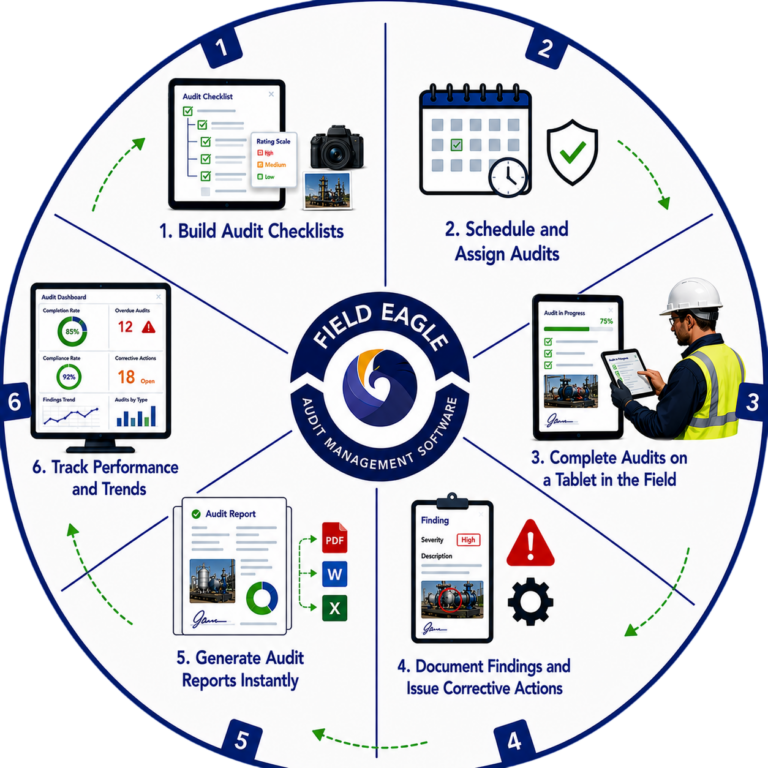
How Field Eagle Audit Management Software Works

1. Build Audit Checklists

Configure your Field Eagle inspection management system to match your operation. Set up clients, locations, and asset registers. Create user accounts with role-based permissions so admins, inspectors, supervisors, and clients each see what they need and nothing they do not. The system supports unlimited locations and assets organized in hierarchies that reflect your operational structure.

2. Schedule and Assign Audits

Assign audits to specific auditors with defined assets, locations, templates, start dates, due dates, and recurrence schedules. Field Eagle's inspection management system enforces audit schedules automatically, sending alerts when audits are due and escalating when they become overdue. Recurring audit schedules are managed automatically without manual coordination.

6. Track Performance and Trends

The management dashboard shows audit completion rates, overdue audits, corrective action status, compliance rates by site and audit type, and recurring finding trends across audit cycles. Audit tracking across the entire program gives audit coordinators and managers visibility into program performance without manual data compilation.

How Field Eagle Safety Inspection Software Works​

3. Complete Audits on a Tablet in the Field

Auditors complete assigned audits directly on a tablet at the audit location. Field Eagle operates fully offline for remote sites, hazardous environments, and any location without connectivity. Photos, notes, measurements, GPS coordinates, and digital signatures are all captured within the audit form. Compliance rating and completion percentage are visible in real time.

5. Generate Audit Reports Instantly

Audit reports generate automatically the moment an audit is submitted. Reports include all findings, photos, evidence, timestamps, auditor signatures, and compliance status. Export to PDF, Word, or Excel. Share with management, clients, or regulators immediately after audit completion. No manual report compilation.

4. Document Findings and Issue Corrective Actions

Every audit finding is logged with photos, severity classification, and description at the point of discovery. Critical findings trigger real-time alerts to the audit coordinator or site manager. Corrective actions are created automatically with assigned owners, due dates, and priority levels. The complete corrective action lifecycle is tracked from finding identification to verified resolution.

Audit Management Software Features

Customizable Audit Checklists

Build audit forms for safety audits, quality reviews, compliance assessments, and supplier audits. Hierarchical structures, criticality scales, required evidence capture, conditional logic, and mandatory completion enforced on every checklist.

Offline Tablet Operation

Complete audits on a tablet in remote sites, underground operations, and hazardous environments without connectivity. Full offline functionality with automatic sync when connectivity returns.

Corrective Action Management

Every audit finding generates a corrective action with assigned owner, priority, and due date. Track resolution from identification to verified closure. Complete audit trail linked to specific audit records and locations.

Compliance Rate Tracking

Compliance rates tracked at audit, site, and portfolio level. Identify which locations, processes, or audit types generate the most non-conformances. Direct resources to where the compliance gaps are.

Audit Scheduling and Assignment

Assign audits to specific auditors with locations, templates, dates, and recurrence. Automatic alerts when audits are due. Escalation when overdue. Recurring schedules managed automatically without manual coordination.

Finding Documentation with Evidence

Log findings with photos, GPS coordinates, severity classification, and description at the point of discovery. Critical findings trigger real-time alerts to audit coordinators and site managers.

Automated Audit Report Generation

Audit reports generate automatically with all findings, photos, evidence, timestamps, and compliance status. Export to PDF, Word, or Excel. Share immediately after audit completion. No manual compilation.

Multi-Site Audit Portfolio Management

Manage audit programs across unlimited sites and clients from one centralized platform. Compare performance between locations. Standardize audit processes company-wide.

Types of Audits Field Eagle Manages

Safety Audits
Safety Audit Software Built for High-Risk Operations​

Safety Audits

Workplace safety audits, site safety inspections, safety management system audits, permit-to-work compliance reviews, and emergency preparedness assessments. Safety audit software that connects findings directly to corrective action workflows.

What Is Quality Inspection Software?

Quality Audits

ISO 9001 quality management system audits, production quality reviews, supplier quality assessments, incoming material audits, and HACCP compliance checks. Quality inspection software for manufacturing and food production operations.

Environmental Audits

Environmental Audits

Environmental compliance reviews, discharge monitoring assessments, waste management audits, emissions compliance checks, and remediation verification inspections. Environmental documentation maintained alongside EHS software records.

Technician completing a smart digital safety checklist on a mobile device

Compliance Audits

OSHA, MSHA, ISO, COR, and other regulatory compliance audits. Field Eagle maintains compliance documentation automatically and makes audit records retrievable for regulatory reviews in seconds.

Industrial team demonstrating inspection accountability using digital tablet for safety inspections near robotic manufacturing equipment

Operational Audits

Process compliance audits, operational procedure reviews, asset condition assessments, and performance verification inspections across sites. Connected to inspection management workflows for comprehensive operational oversight.

Showing Slide 1 of 5

What Our Clients Say About Us

Frequently Asked Questions

Operational audit management software coordinates audit scheduling, fieldwork, evidence collection, findings, corrective actions and reporting in one system. Field Eagle is designed for operational and industrial audits conducted across facilities, equipment, assets and remote field locations.

Audit management software controls the complete audit process, while a checklist app primarily records answers. Field Eagle connects audit checklists with scheduling, assignments, evidence, findings, corrective actions, dashboards and searchable audit histories.

Yes. Field Eagle allows organizations to schedule recurring or one-time audits and assign them to specific inspectors, teams, locations or assets. Managers can monitor upcoming, completed and overdue audits from a centralized platform.

Yes. Field Eagle allows auditors to complete forms, capture photographs, record measurements, add GPS information and collect signatures without connectivity. The audit records and supporting evidence synchronize with the central system when an internet connection becomes available.

Yes. Field Eagle maintains a traceable record of audit responses, timestamps, evidence, findings, approvals and corrective actions. This helps organizations demonstrate what was checked, who performed the audit and how identified issues were resolved.

Field Eagle connects each audit finding to an assigned corrective action, responsible owner, priority and due date. Managers can monitor open and overdue actions through the central inspection management dashboard until each issue is verified as resolved.

Yes. Field Eagle centralizes audit schedules, forms, findings and reports across multiple facilities and field locations. Organizations can standardize their core audit process while configuring location-specific requirements where necessary.

Yes. Field Eagle supports distributed audit teams working across multiple sites, clients and operational areas. Managers can assign responsibilities, monitor completion and compare audit performance without manually consolidating records from separate systems.

Yes. Field Eagle keeps previous audit records, supporting evidence, findings and corrective-action histories in a searchable system. Teams can retrieve the required documentation and generate audit-ready reports without manually assembling information from paper forms and spreadsheets.

Yes. Field Eagle can be configured for facility, equipment, safety, maintenance and operational audits. Organizations can create different checklists and evidence requirements for each audit type while managing the resulting records through one platform.

Yes. Field Eagle allows audit service companies to manage separate programs, forms, records and reports for multiple clients. Client information remains separated while the audit company manages its overall workload from one centralized system.