Update cookies preferences

Inspection Data Management Software for Industrial Operations

Field Eagle gives operations teams a centralized platform to manage all inspection data across every asset, site, and inspection cycle. Store inspection records, track asset condition histories, manage compliance documentation, and analyse data across the entire operation from one searchable database. Every inspection your team completes feeds directly into the inspection data management system automatically.

Centralized database for all inspection records. Searchable and retrievable in seconds for regulatory reviews. Built for oil and gas, mining, construction, manufacturing, and utilities.

No obligations, See how it works for yourself.

What Is Inspection Data Management Software?

Inspection data management software is a digital platform that stores, organizes, and makes accessible all data generated by field inspection programs. It connects inspection findings, asset condition records, corrective action histories, compliance documentation, and performance metrics in one centralized system that operations teams can search, analyse, and retrieve from anywhere.

The difference between inspection data management software and a simple inspection tool is what happens after the inspection is submitted. A basic inspection tool captures data and generates a report. Inspection data management software stores that report in a structured database linked to the specific asset, location, and inspector it relates to, tracks how that asset’s condition changes across inspection cycles, connects the finding to any corrective actions it generates, and makes everything searchable and retrievable the moment it is needed. This is what makes AI Preventative Maintenance possible – years of structured inspection data that can be analysed to predict failures.

excel at regulatory compliance with field eagle

Without centralized inspection data management, inspection programs generate data that gets used once and then becomes inaccessible for practical purposes.

  • Inspection reports sit in filing cabinets or disconnected folders with no way to search across them for patterns or trends
  • Asset condition histories are impossible to reconstruct because data from different inspection cycles is not linked to the same asset record
  • Regulatory reviews require hours of manual document retrieval from scattered files rather than seconds from a searchable database
  • Corrective action outcomes are never linked back to the inspections that generated them, making it impossible to evaluate whether interventions worked
  • Trend analysis across inspection history requires manual data compilation that is too time-consuming to do systematically

Field Eagle inspection data management software eliminates all of these problems. Every inspection, every finding, every corrective action outcome, and every asset condition rating is stored in a structured, searchable database that connects everything together and makes the full picture of your inspection program performance visible and accessible.

How Field Eagle Inspection Data Management Works

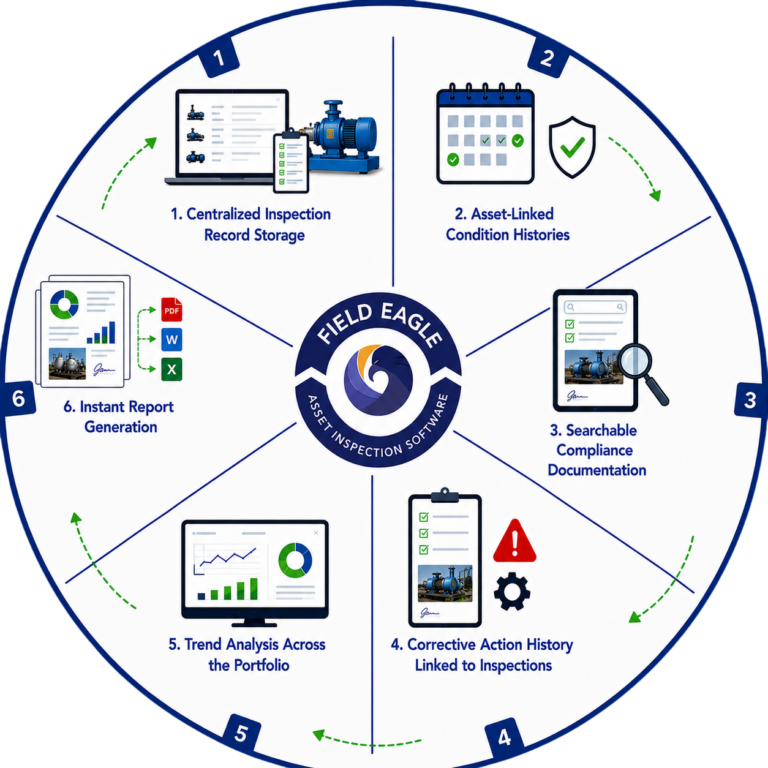
1. Centralized Inspection Record Storage

Every inspection completed through Field Eagle is stored automatically in a centralized database. Records include the completed inspection checklist, all findings with photos and notes, compliance ratings, inspector identification, timestamps, GPS coordinates, and the generated inspection report. Nothing requires manual filing. Everything is available the moment the inspection is submitted.

2. Asset-Linked Condition Histories

Every inspection record is linked to the specific asset it relates to. Over time, this builds a complete condition history for every asset in your operation. You can view the full inspection history for any asset across any time period, see how condition ratings have changed across inspection cycles, track which defects have appeared, been resolved, and reappeared, and compare condition trends across similar assets in the fleet. This longitudinal data is what asset integrity management programs depend on.

6. Instant Report Generation

Inspection data stored in Field Eagle generates reports automatically. Asset condition reports, punch list reports, final compliance reports, activity summaries, and performance reports all pull from the same centralized data store. Export to PDF, Word, or Excel and share immediately. No manual compilation from scattered data sources.

How Field Eagle Inspection Data Management Works

3. Searchable Compliance Documentation

When a regulator, insurer, or client requests inspection documentation, Field Eagle retrieves it in seconds. Search by asset, location, date range, inspection type, inspector, finding category, or compliance standard. Compliance documentation that previously required hours of manual retrieval from paper files is available immediately.

5. Trend Analysis Across the Portfolio

Field Eagle's reporting and analytics tools analyse inspection data across time periods, asset types, locations, and inspection categories. Identify which assets are showing the fastest condition decline, which sites generate the most findings, which defect types recur most frequently, and how inspection completion rates are trending. Combined with AI Preventative Maintenance, this data becomes the foundation for failure prediction across your entire asset fleet.

4. Corrective Action History Linked to Inspections

Every corrective action generated from an inspection finding is stored alongside the inspection record it came from. When an action is resolved, the resolution is linked back to the original finding. This creates a complete audit trail from deficiency identification through to verified resolution, which is exactly what regulatory compliance programs require.

Inspection Data Management Software Features

Centralized Inspection Database

All inspection records stored in a structured, searchable database linked to specific assets, locations, and inspectors. Accessible from anywhere, instantly retrievable for regulatory reviews or management reporting.

Advanced Search and Retrieval

Search inspection records by asset, location, date range, inspection type, inspector, finding category, compliance standard, or any combination. Retrieve any record in seconds regardless of how old it is.

Cross-Portfolio Analytics

Analyse inspection data across time periods, asset types, locations, and inspection categories. Identify trends, compare performance between sites, and surface the patterns that inform maintenance and compliance decisions.

Offline Data Capture

Inspectors complete work on a tablet offline in any environment. All data syncs to the central database automatically when connectivity returns. No data loss regardless of site conditions.

Asset Condition History Tracking

Complete inspection history for every asset across all inspection cycles. Condition ratings, defect records, corrective action outcomes, and maintenance activities all linked to the asset record permanently.

Corrective Action Audit Trail

Every corrective action linked to the inspection finding that generated it and the resolution that closed it. Complete audit trail from deficiency identification to verified closure for every finding across the operation

Automated Report Generation

Asset condition reports, compliance reports, activity summaries, and performance reports generated automatically from centralized inspection data. Export to PDF, Word, or Excel instantly.

Multi-Site Portfolio Management

Manage inspection data across unlimited sites, locations, and clients from one centralized platform. Compare data between sites, standardize inspection processes, and maintain consistent documentation standards company-wide.

Inspection Data Management by Industry

Oil and Gas
risk based inspection

Oil and Gas

Centralized management of pressure vessel inspection records, pipeline condition data, storage tank histories under API 653, rotating equipment maintenance records, and regulatory compliance documentation. Oil and gas operations depend on complete, retrievable inspection data histories for both operational decisions and regulatory compliance.

Mining
using data to improve mining operations

Mining

Equipment inspection histories across surface and underground operations, ground support condition records, conveyor and crusher inspection data, MSHA compliance documentation, and site safety audit records all centralized and searchable. Mining inspection data managed across multiple sites from one platform.

Construction
Construction inspector using field eagle

Construction

Site safety inspection records, equipment pre-use check histories, quality inspection data, and OSHA compliance documentation across multiple active project sites. Construction inspection data that follows equipment as it moves between projects.

Manufacturing
Manufacturing Production Line

Manufacturing

Production quality inspection records linked to specific batches and production runs, equipment condition histories, ISO compliance documentation, and corrective action audit trails. Manufacturing inspection data that supports both quality assurance and regulatory compliance.

Showing Slide 1 of 4

What Our Clients Say About Us

Frequently Asked Questions

Field Eagle is a Field Inspection Software and an Asset Inspection Software. it is a fully customizable inspection software that allows companies and agencies in conducting Inspections that are Regulatory body compliant. This Inspection Managment software can be integrated with any ERP or software to make your inspections much simpler to Manage as well.

An inspection data management system centralizes inspection records, evidence, findings, corrective actions, and reports in a searchable database.
Field Eagle connects each inspection to the relevant asset, site, or location. This gives teams a structured history of inspection results instead of leaving information scattered across paper forms, spreadsheets, and emails.

An oil and gas inspection data management system should support offline data collection, asset histories, photographs, measurements, audit trails, corrective actions, and compliance reporting.
It should also connect inspection records to the relevant well, pipeline, facility, or equipment asset so teams can track condition and recurring findings across inspection cycles.

Field Eagle stores completed forms, measurements, photographs, signatures, findings, and corrective actions within a centralized system.
Managers can review inspection results by asset, site, inspection type, inspector, or reporting period. This makes it easier to identify unresolved issues and retrieve previous records.

Inspection data is centralized by synchronizing field records into one database and connecting each record to its applicable asset or location.
Field Eagle allows authorized users to access current and historical inspection information without manually combining files from different inspectors, devices, or sites.

Yes. Field Eagle can centralize inspection data for utility assets, facilities, and distributed infrastructure.
Utility teams can store condition ratings, measurements, photographs, defects, and corrective actions against the applicable pole, substation, pipeline, facility, or other asset.

Field Eagle stores submitted inspection data in a centralized digital database where authorized users can search and retrieve historical records.
Completed inspections remain connected to their evidence, findings, signatures, corrective actions, and related assets. Specific retention and archival requirements should be confirmed and configured during implementation.

Yes. Field Eagle can maintain a traceable history of inspection records and follow-up actions.
Timestamps, inspector information, findings, status changes, and corrective-action updates help teams understand what was recorded, who completed the work, and how an issue progressed toward resolution.

Yes. Field Eagle can connect tank inspection results to individual tank records.
Teams can store condition assessments, measurements, photographs, identified defects, and corrective actions for each tank. This creates a historical record that can be reviewed during future inspections and maintenance planning