
Update cookies preferences

Inspection Reporting Software That Delivers Reports Directly to Your Clients

The report is the product your clients pay for. Field Eagle inspection reporting software generates professional, branded inspection reports automatically from field data and makes them available to your clients the moment an inspection is submitted, through a built-in client portal that carries your branding, not ours. No manual PDF export. No email attachment. No client chasing you for yesterday’s report.

Reports generated automatically the moment an inspection is submitted. Clients access reports directly through their own branded portal.  No Field Eagle branding anywhere.

No obligations, See how it works for yourself.

The Report Delivery Problem for Inspection Companies

For most inspection companies, report delivery is the most time-consuming administrative task in the business. Inspectors submit completed inspections. Someone in the office exports a PDF, formats it, adds branding, and emails it to the client. The client emails back asking about a historical report from six months ago. Someone manually retrieves it and sends it. The client’s compliance auditor requests documentation for all inspections in the last two years. Someone spends three hours pulling records and compiling them into a package.

Multiply this across multiple clients and dozens of inspections per week and report delivery becomes a significant operational burden that grows with the business.

Field Eagle eliminates the entire manual process. Reports generate automatically. Clients access them directly. Historical records are retrievable in seconds. The administrative overhead disappears.

The Report Delivery Problem for Inspection Companies​

What Professional Inspection Reports from Field Eagle Include

  • Company or client branding – your logo, colors, and report layout throughout
  • All inspection findings with severity classifications and descriptions
  • High-resolution photos linked to specific findings with GPS coordinates
  • Asset condition ratings and compliance scores
  • Timestamps and inspector digital signatures
  • Corrective actions generated from findings with assigned owners and due dates
  • Overall compliance status and pass/fail summary
  • Asset register details linking the inspection to the specific asset inspected
  • Custom sections configured for each client’s specific reporting requirements

How Field Eagle Inspection Reporting Works for Service Companies

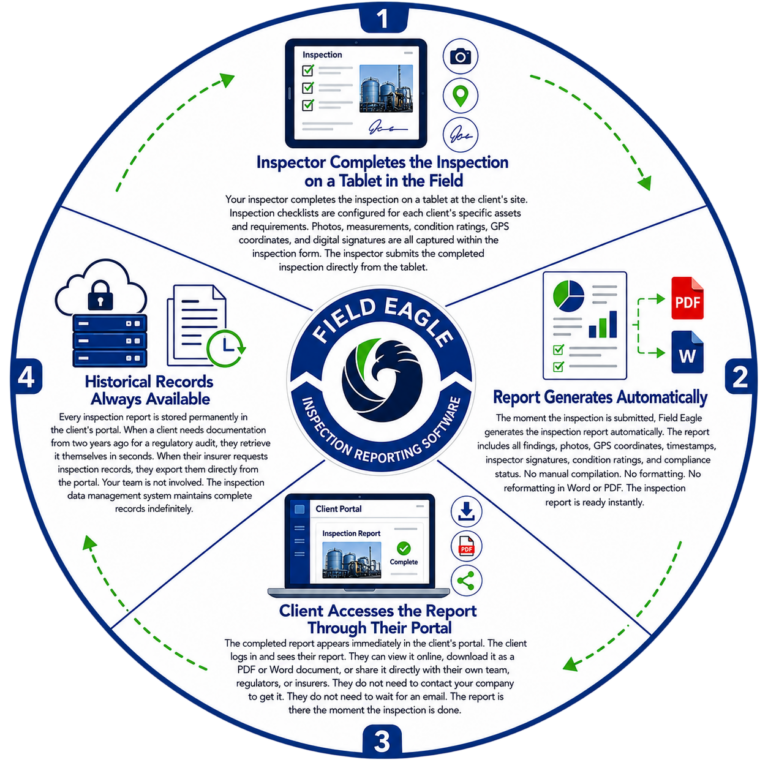
1. Inspector Completes the Inspection on a Tablet in the Field

Your inspector completes the inspection on a tablet at the client's site. Inspection checklists are configured for each client's specific assets and requirements. Photos, measurements, condition ratings, GPS coordinates, and digital signatures are all captured within the inspection form. The inspector submits the completed inspection directly from the tablet.

4. Historical Records Always Available

Every inspection report is stored permanently in the client's portal. When a client needs documentation from two years ago for a regulatory audit, they retrieve it themselves in seconds. When their insurer requests inspection records, they export them directly from the portal. Your team is not involved. The inspection data management system maintains complete records indefinitely.

2. Report Generates Automatically

The moment the inspection is submitted, Field Eagle generates the inspection report automatically. The report includes all findings, photos, GPS coordinates, timestamps, inspector signatures, condition ratings, and compliance status. No manual compilation. No formatting. No reformatting in Word or PDF. The inspection report is ready instantly.

3. Client Accesses the Report Through Their Portal

The completed report appears immediately in the client's portal. The client logs in and sees their report. They can view it online, download it as a PDF or Word document, or share it directly with their own team, regulators, or insurers. They do not need to contact your company to get it. They do not need to wait for an email. The report is there the moment the inspection is done.

Report Types Field Eagle Generates for Inspection Companies

Custom Report

Field Eagle can generate customized report as per your requirement. Set up your Custom metrics to generate any report needed. This gives you a comitative edge with your clients over your competitors.

Safety Audit Reports

Formal safety audit reports for OSHA, MSHA, ISO 45001, and COR compliance programs. All findings documented with photographic evidence and corrective action requirements. See: safety audit software.

Portfolio Performance Reports

Trend reports showing inspection completion rates, compliance scores, and corrective action resolution performance over time. Used by asset management teams and senior operations managers to assess program performance.

Punch List Reports

Categorized deficiency lists generated from inspection findings, sorted by severity as Critical, Major, and Minor. Used by construction and industrial clients to prioritize corrective work.

Asset Condition Reports

Detailed condition assessment reports for individual assets including pressure vessels, pipelines, storage tanks, mechanical equipment, and infrastructure. Linked to the specific asset record showing condition history across inspection cycles.

Corrective Action Status Reports

Status reports tracking all open corrective actions across a client's inspection program. Shows which findings are resolved, which are in progress, and which are overdue. Clients access these directly through their portal.

Compliance Summary Reports

Overall compliance status reports for regulatory submissions, insurance reviews, and management reporting. Generated automatically from inspection data without manual compilation.

Results Field Eagle Delivers

Frequently Asked Questions

Yes. All Field Eagle inspection reports are fully brandable. Your logo, colors, typography, and report layout are all configurable. There is no Field Eagle branding anywhere in the reports your clients receive. The reports look and feel like professional deliverables from your inspection company.

Immediately. The moment an inspector submits a completed inspection in Field Eagle, the report is generated automatically and appears in the client’s portal. There is no manual processing, no office staff involvement, and no delay. If the inspector submits from the field with connectivity, the client can see the report in real time.

Yes. Field Eagle inspection reports export to PDF, Word, and Excel. Clients can download reports directly from their portal in whichever format they require for their compliance documentation, regulatory submissions, or internal reporting.

Field Eagle retains all inspection reports indefinitely. There is no automatic deletion or archiving. Every report from the beginning of a client engagement is always accessible through their portal. This is critical for industrial clients where inspection records must be maintained for the operational life of an asset.

Yes. Report formats are configurable per client. One client may require a specific layout with their own logo for regulatory submissions. Another client may prefer a different format for internal management reporting. Field Eagle supports multiple report configurations within the same platform.

Request a Free Demo

Call Us

Call or Fill out the Form

or Fill out the Form

Request a Demo


Request a Feature

Request a Feature

Contact Us


We take your privacy seriously and will never share your information.

Contact Us


We take your privacy seriously and will never share your information.

Request a Demo


We take your privacy seriously and will never share your information.

Podcast