Oilfield equipment inspection is one of the most demanding inspection environments in any industry. Harsh environmental conditions, remote locations, complex regulatory requirements, and equipment that operates under extreme pressure and temperature all create inspection challenges that generic inspection tools are not built to handle.
This article covers what oilfield equipment inspection software needs to do, the features that separate effective platforms from inadequate ones, and what to look for when evaluating options for oil and gas operations.
What Makes Oilfield Equipment Inspection Different
Oilfield equipment inspection differs from general industrial inspection in several important ways:
Regulatory Complexity
Oil and gas operations are governed by overlapping regulatory frameworks. Federal regulations from BSEE, PHMSA, or equivalent national bodies. State or provincial regulations from agencies like the AER in Alberta. Industry standards including API 580, API 581, API 653, and API 570. Environmental regulations from the EPA or provincial equivalents. Effective oilfield inspection software must support documentation that satisfies all of these frameworks simultaneously rather than any one in isolation. Standards compliance documentation that covers multiple regulatory frameworks is a non-negotiable requirement.
Remote and Offshore Environments
Oilfield inspections happen in environments where internet connectivity is unavailable or unreliable. Offshore platforms, remote onshore wells, pipeline corridors, and underground facilities all require inspection software that operates fully offline and syncs data when connectivity is available. Software that requires connectivity to function is not usable in these environments.
Asset Complexity and Volume
A single oilfield facility may have hundreds of pressure vessels, thousands of meters of piping, multiple rotating equipment trains, and extensive electrical and instrumentation systems. Asset integrity management for oilfield equipment requires software that handles complex asset hierarchies and large asset populations while maintaining individual equipment inspection histories.
High Consequence of Failure
Equipment failures in oil and gas operations have consequences that range from significant to catastrophic. A pressure vessel failure can cause explosion, fire, and fatalities. A pipeline leak can cause environmental contamination at scale. A wellhead failure can result in an uncontrolled release. The inspection software that supports equipment integrity programs in this environment must be reliable, comprehensive, and produce documentation that would withstand regulatory scrutiny after an incident.
Key Features of Effective Oilfield Equipment Inspection Software
Full Offline Operation
Oilfield inspection software must function completely offline. Inspectors on offshore platforms, at remote well sites, and in other low-connectivity environments cannot depend on internet access to complete inspections. The software should store all data locally on the tablet during offline use and sync automatically when connectivity is restored, with no data loss regardless of connection quality.
API Standard Inspection Templates
The software should include or support the creation of inspection templates aligned with API 580, API 581, API 653, API 570, and other relevant standards. These templates define the inspection items, measurement fields, and documentation requirements for each equipment type under the applicable standard. Prebuilt industry templates aligned with API standards significantly reduce the time required to implement a compliant inspection program.
Asset Integrity Management Integration
Oilfield equipment inspection software should connect inspection findings directly to asset records, building the condition histories that risk based inspection methodology requires. Thickness measurements linked to specific locations on a pressure vessel, corrosion assessments linked to pipe segments, and structural condition ratings linked to individual components all provide the longitudinal data that informs remaining life calculations and risk assessments.
Risk Based Inspection Support
Effective oilfield inspection programs implement risk based inspection methodology that assigns inspection frequency and intensity based on failure probability and consequence rather than fixed calendar intervals. The software should support the documentation of risk assessments for individual assets and enforce inspection schedules based on risk classification.
Corrective Action and Work Order Management
When an inspection identifies a defect, that defect needs to be formally documented, assigned for resolution, and tracked to verified closure. Corrective action management that connects directly to maintenance work order systems avoids the manual handoffs that allow findings to be lost between the inspection team and the maintenance team.
Photo Documentation and Annotation
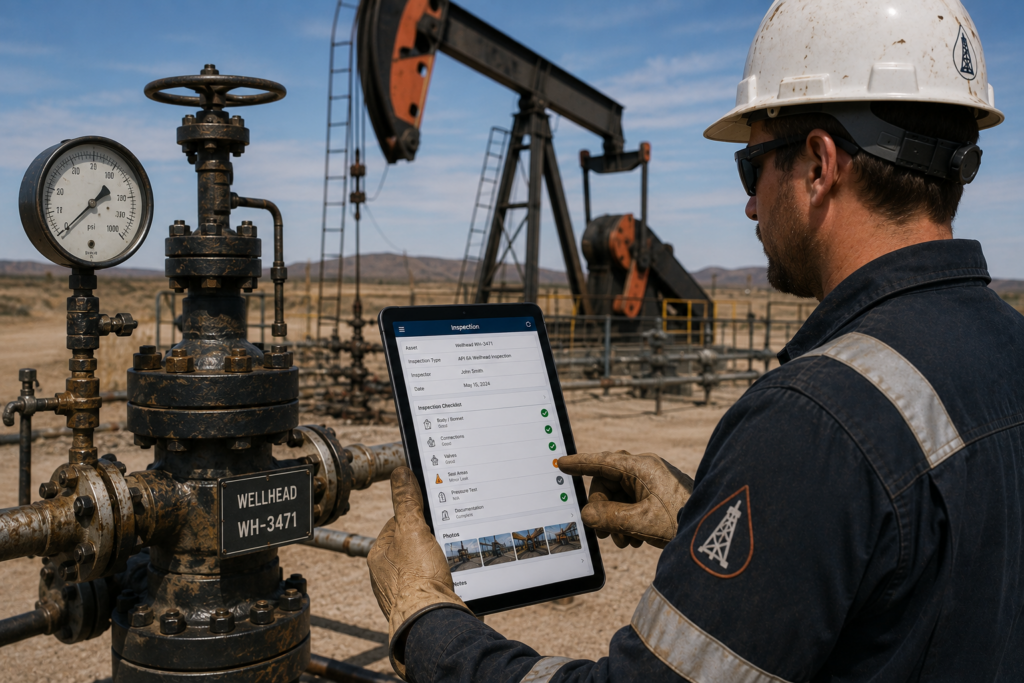
Oilfield inspection findings frequently require visual documentation. A pressure vessel with visible external corrosion, a flange with damaged insulation, or a relief valve with signs of leakage all require photo evidence that supports maintenance decisions and regulatory documentation. The software should support photo capture attached directly to specific inspection items, with annotation capability for marking areas of concern.
Compliance Reporting
The software must generate inspection reports that meet the documentation requirements of applicable regulatory frameworks. These reports need to include inspection date, inspector identification, assets inspected, methods used, findings with severity classifications, corrective actions recommended, and next inspection due dates. Reports should be generated automatically from inspection data rather than requiring manual compilation.
Evaluation Criteria for Oilfield Inspection Software
When evaluating oilfield equipment inspection software, prioritize these questions:
- Can the software operate completely offline on the specific devices your inspection team will use in the field?
- Does it support the API standards applicable to your equipment inventory?
- Can it build asset hierarchies complex enough for your facility structures?
- Does it connect inspection findings to asset records and support condition trending?
- What is the corrective action workflow from finding identification to verified resolution?
- What implementation support is provided for template configuration and team training?
Frequently Asked Questions
Oilfield inspection software should support API 580 and 581 for risk-based inspection, API 653 and 650 for storage tanks, and API 570 for piping. In addition, it should accommodate BSEE, AER, regional, and environmental requirements. However, the applicable standards depend on the equipment, operation, and jurisdiction.
Effective offline inspection software stores forms, asset records, and reference materials on the device before fieldwork. Therefore, inspectors can complete inspections, capture photographs, and record findings without connectivity. Once the device reconnects, the software automatically synchronizes all data with the central database.
Risk-based inspection sets inspection intensity according to each asset’s failure probability and consequences rather than fixed intervals. Therefore, teams inspect high-risk equipment more often and lower-risk equipment less frequently. API 580 and API 581 formalize this approach for pressure equipment, improving safety and resource use.
Pressure vessel records should link to each vessel’s asset ID and track thickness measurements by location. In addition, inspectors should document test methods, defects, severity, recommended actions, and remaining-life calculations. Finally, records should specify the next inspection date under the applicable API or regulatory standard.
Yes. Effective oilfield inspection software supports several inspectors working simultaneously across equipment types. For example, managers can assign work by equipment, area, or specialty. Meanwhile, role-based controls limit access to relevant tasks, while a centralized dashboard shows overall progress.