
Update cookies preferences

Construction Asset Management Software

Field Eagle gives construction companies the tools to track every piece of equipment, schedule and conduct inspections on a tablet, manage maintenance proactively, and keep assets running across every active project site. Stop losing time and money to unexpected breakdowns and untracked equipment.

Tablet-based and offline-capable. Tracks equipment from cranes to compressors across multiple job sites. Supports OSHA, IHSA, and construction safety compliance requirements.

No obligations, See how it works for yourself.

What Is Construction Asset Management?

Construction asset management is the systematic process of tracking, inspecting, maintaining, and optimizing the equipment and physical assets used across construction projects. It covers everything from heavy machinery like cranes, excavators, and concrete pumps, to fleet vehicles, power tools, scaffolding systems, and temporary facilities.

Effective construction asset management ensures that equipment is available when needed, in safe working condition, compliant with inspection requirements, and deployed efficiently across project sites. Without a structured system, construction companies face equipment downtime at critical project milestones, safety incidents caused by uninspected or poorly maintained equipment, compliance failures during regulatory audits, and significant capital waste from assets that degrade faster than they should.

Field Eagle delivers construction asset management software specifically designed for the complexity and pace of construction operations. The platform runs on tablets, works offline on job sites without reliable connectivity, and gives project managers and equipment coordinators real-time visibility into asset condition and availability across every active site.

What Is Construction Asset Management?

Construction equipment management problems follow familiar patterns on every job site. The root cause is almost always the same: no single system connecting asset location, inspection status, maintenance history, and availability across projects.

  • Equipment showing up on site in poor condition because pre-use inspections were skipped or not documented
  • Breakdowns at critical project milestones because maintenance was reactive rather than scheduled
  • Equipment deployed to the wrong site or sitting idle because there is no visibility into the fleet across projects
  • OSHA and IHSA compliance failures during audits because inspection records are on paper or missing entirely
  • Rental disputes because condition at check-in and check-out was not properly documented
  • Maintenance history lost when equipment moves between projects because records are kept in filing cabinets at head office

Field Eagle eliminates all of these problems. Pre-use inspections are completed on a tablet and linked to the equipment record. Maintenance is scheduled automatically based on hours or calendar intervals. Equipment condition is documented with photos at every inspection. Compliance records are stored digitally and retrievable in seconds. And every equipment record follows the asset regardless of which site it is deployed to.

How Field Eagle Construction Asset Management Software Works

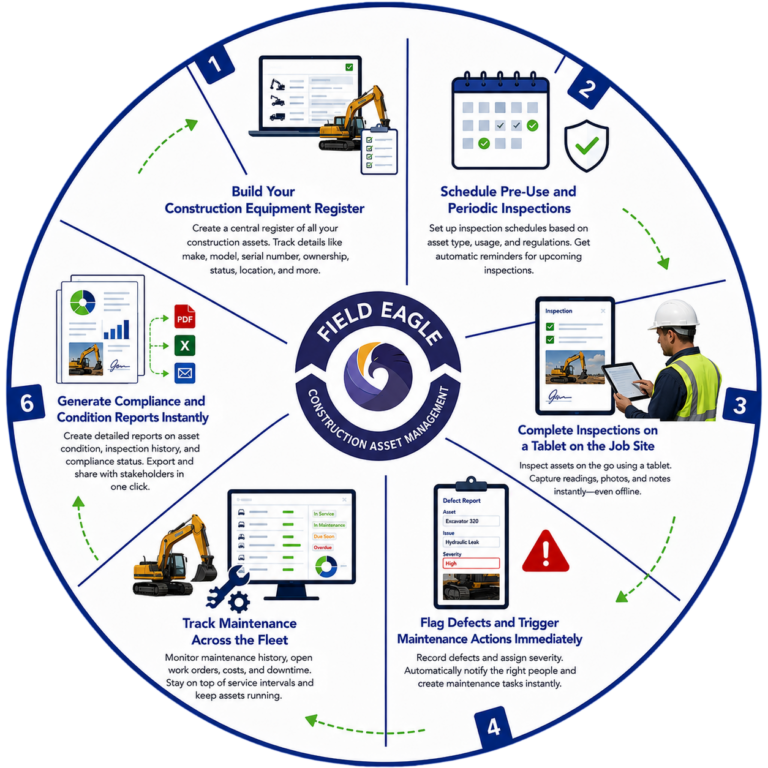
1. Build Your Construction Equipment Register

Create a complete register of every asset in your construction fleet - cranes, excavators, compressors, generators, scaffolding systems, vehicles, and any other equipment your operation relies on. Each asset record stores identification details, specifications, purchase or rental information, insurance and certification expiry dates, maintenance history, and all associated inspection records. Barcodes and RFID tags can be linked to individual assets for rapid identification in the field.

2. Schedule Pre-Use and Periodic Inspections

Assign inspection requirements to every asset based on regulatory requirements, manufacturer recommendations, and your own operational standards. Daily pre-use inspections, weekly condition checks, monthly service inspections, and annual certification reviews are all configurable. Field Eagle sends automatic alerts when inspections are due and escalates when they become overdue. Equipment cannot slip through the scheduling cracks.

6. Generate Compliance and Condition Reports Instantly

Asset condition reports, inspection summaries, compliance documentation, and punch list reports generate automatically from inspection data. Reports include all findings, photos, timestamps, inspector signatures, and compliance status. Export to PDF, Word, or Excel and share with project owners, safety officers, regulators, or insurance providers immediately. No manual compilation. No digging through paper files.

How Field Eagle Construction Asset Management Software Works

3. Complete Inspections on a Tablet on the Job Site

Equipment operators, foremen, and safety officers complete construction asset inspections directly on a tablet at the equipment location. Field Eagle operates fully offline on job sites without reliable connectivity. Inspection forms capture condition ratings, fluid levels, safety device functionality, photos of damage or wear, and digital sign-off from the inspector. Every inspection is timestamped and linked to the specific asset record.

5. Track Maintenance Across the Fleet

Field Eagle maintains a complete maintenance history for every asset regardless of which site it is currently deployed to. Service records, repair history, parts replaced, and inspection findings all accumulate in the asset record over its operational life. This history informs maintenance scheduling decisions, supports warranty claims, provides evidence for insurance purposes, and builds the data needed for informed asset replacement decisions.

4. Flag Defects and Trigger Maintenance Actions Immediately

When an inspection identifies a defect or safety concern, it is logged with photos, severity rating, and description in real time. Critical defects trigger immediate alerts to the site foreman or equipment manager. Corrective maintenance actions are created automatically with assigned owners and due dates. Equipment that fails a safety inspection can be flagged as out of service within the system, preventing it from being deployed until the defect is resolved.

Construction Asset Management Software Features

Equipment Register

Equipment Register Complete register of every asset in your construction fleet with full specification, certification, maintenance history, and inspection records. Barcode and RFID support for rapid asset identification in the field.

Offline Tablet Inspections

Complete equipment inspections on a tablet on any job site without internet connectivity. Full offline functionality with automatic sync when connectivity returns. Inspection records always linked to the correct asset.

Fleet-Wide Maintenance History

Complete maintenance and inspection history for every asset regardless of site deployment. Service records, repair history, and parts replaced stored in the asset record permanently. Accessible from anywhere.

Compliance Documentation

OSHA and IHSA compliant inspection records maintained automatically. Every record timestamped, signed, and linked to the specific asset. Retrieve any inspection record instantly for regulatory reviews or owner audits.

Automated Inspection Scheduling

Automated Inspection Scheduling Schedule pre-use, periodic, and certification inspections for every asset. Automatic alerts when inspections are due. Escalation when overdue. Equipment certification expiry tracking and renewal reminders.

Defect Management and Out-of-Service Flagging

Document defects with photos and severity ratings in real time. Flag equipment as out of service directly from the inspection. Corrective actions created automatically with assigned owners and due dates.

Multi-Site Visibility

Monitor equipment inspection status, condition, and availability across all active project sites from one centralized dashboard. Compare asset performance between sites. Identify underutilized equipment available for redeployment.

Automated Report Generation

Asset condition reports, inspection summaries, and compliance documentation generate automatically. Export to PDF, Word, or Excel instantly. Share with project owners, safety officers, or regulators without any manual preparation.

Field Eagle is configured to manage every category of asset in a construction operation:

  • Heavy machinery – cranes, excavators, bulldozers, graders, and scrapers
  • Lifting equipment – forklifts, aerial work platforms, and material hoists
  • Concrete and paving equipment – concrete pumps, batch plants, and pavers
  • Compaction equipment – rollers, compactors, and plate compactors
  • Fleet vehicles – dump trucks, water trucks, and service vehicles
  • Power generation and compressed air – generators and compressors
  • Scaffolding and formwork systems
  • Small tools and equipment – power tools, surveying equipment, and safety gear
  • Temporary facilities – site offices, sanitation, and welfare facilities

Every asset type can be configured with its own inspection checklist, maintenance schedule, and compliance documentation requirements within Field Eagle.

What Our Clients Say About Us

Frequently Asked Questions

Field Eagle is a Field Inspection Software and an Asset Inspection Software. it is a fully customizable inspection software that allows companies and agencies in conducting Inspections that are Regulatory body compliant. This Inspection Managment software can be integrated with any ERP or software to make your inspections much simpler to Manage as well.

Construction asset management software tracks, inspects, maintains, and manages equipment and physical assets across construction projects. Field Eagle connects asset records with inspections, condition data, photographs, maintenance findings, corrective actions, and service history in one system.

Construction asset tracking software maintains a centralized record of each asset’s location, condition, inspection history, and outstanding issues. When equipment moves between projects, Field Eagle keeps its records connected to the asset so managers can see where it is deployed and whether it is ready for use.

Yes. Field Eagle centralizes construction equipment and asset records across multiple projects and locations. Managers can review asset assignments, completed inspections, unresolved defects, and condition histories without maintaining separate spreadsheets for every job site.

Yes. Field Eagle can manage both fixed construction assets and mobile equipment. Teams can create asset hierarchies for facilities, infrastructure, heavy equipment, machinery, tools, and individual components while maintaining a separate inspection and service history for each record.

Every inspection can be assigned to the specific construction asset being examined. Completed forms, measurements, photographs, defects, corrective actions, and reports remain connected to that asset through Field Eagle’s asset inspection software.

Yes. Field Eagle stores inspections, service records, identified defects, corrective actions, and supporting documents against each asset. This gives construction teams a chronological equipment history that supports maintenance planning and helps prevent unresolved problems from being lost between projects.

Yes. Field Eagle can store equipment certifications, inspection records, supporting documentation, and relevant expiry dates against the applicable asset. Teams can use these records to identify upcoming requirements and retrieve organized evidence during internal or regulatory reviews.

Yes. Field Eagle allows inspectors and equipment operators to complete inspections without an internet connection. Users can record condition ratings, measurements, photographs, signatures, and equipment defects offline, and the information synchronizes with the central asset record when connectivity returns.