
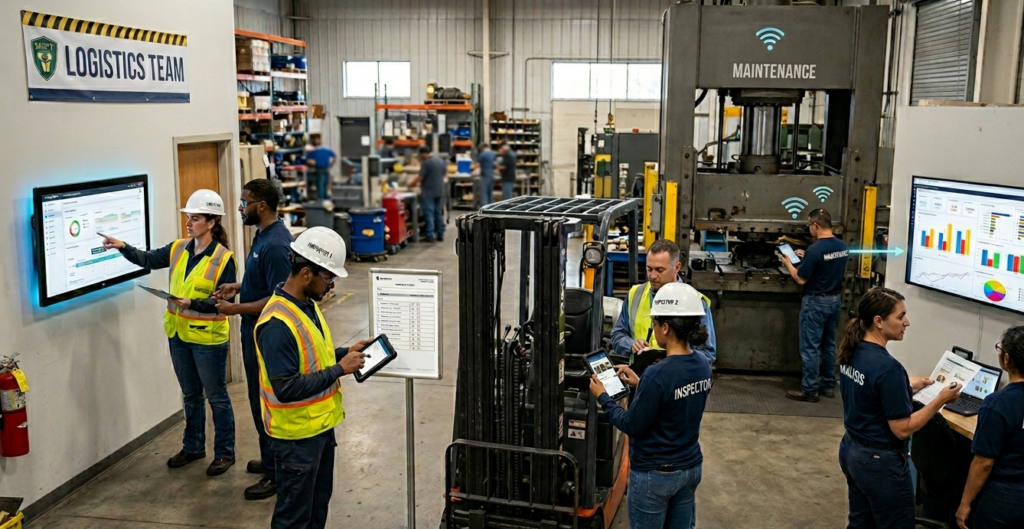
Why Implementation Approach Determines Success
The technology is not the hard part. Digital inspection platforms are intuitive, well-documented, and supported. The hard part is human change management: getting inspectors who have used clipboards for 10 years to trust a tablet, and getting supervisors who have managed paper-based processes to rely on digital data.
According to McKinsey research on technology adoption, organizations that invest in structured change management during technology implementation achieve adoption rates of 90 to 95 percent. Organizations that approach implementation as a pure technical project achieve adoption rates of 30 to 50 percent. The implementation plan is as important as the platform.
Step 1: Assess and Plan (Weeks 1 to 2)
Current State Assessment
Before implementing anything, document your current inspection program clearly:
- How many inspections are conducted daily, weekly, and monthly?
- How many inspectors are involved?
- What types of inspections: safety, equipment, compliance, quality?
- What are the biggest pain points: data entry, lost records, missed inspections, compliance gaps?
- What regulations govern your inspection program?
This assessment becomes the baseline against which you measure results and the foundation for your implementation plan.
Define Success Metrics Before Starting
Identify 3 to 5 measurable outcomes that will determine whether implementation is successful:
- Inspection completion rate: target 95 percent or higher
- Data entry labor hours: target 50 percent reduction within 90 days
- Time from inspection to management visibility: target same-day
- Compliance citation rate: target zero documentation-related citations
- Inspector time per inspection: target 30 percent reduction
Identify Your Champion
Every successful implementation has an internal champion who is enthusiastic about the change, credible with peers, and willing to invest time in training and troubleshooting. However, this person is not necessarily the most senior. Instead, they are the one who says, “This is going to make our work better,” and means it.
Step 2: Configure and Customize (Weeks 2 to 4)
Checklist Development
Field Eagle includes pre-built checklists for common inspection types in oil and gas, mining, construction, and manufacturing. First, review the pre-built checklists against your current paper forms. Then, identify what needs to be added, removed, or modified. Keep initial checklists simpler than your paper forms: complexity is added after the team is comfortable with the platform, not before.
Hardware Setup
Rugged tablets are the standard hardware for field inspection. Specifications to prioritize:
- Drop resistance: minimum MIL-STD-810G rated for your environment
- IP rating for dust and water resistance appropriate to your sites
- Battery life: 10 hours minimum for full-shift use
- Screen visibility in direct sunlight
- Glove-compatible touchscreen for outdoor environments
System Configuration
Configure user accounts, permissions, and notification settings before training. Supervisors should receive alert notifications for critical findings. Management should receive daily summary reports. Inspectors should receive inspection reminders and completion confirmations.
Step 3: Pilot Program (Weeks 4 to 8)
Select Your Pilot Group Carefully
The pilot group should include 3 to 5 people: a mix of experienced inspectors and early adopters covering one inspection type at one location. Moreover, choose your highest-volume routine inspection rather than your most complex or regulated process. As a result, early success builds confidence for the full rollout.
Run Parallel Operations During Pilot
During the pilot period, inspectors complete both the digital inspection and the paper inspection for the same event. This sounds redundant but serves three purposes: it provides a safety net if digital data has any issues, it allows comparison between digital and paper outputs to verify accuracy, and it gives inspectors time to build confidence without removing the familiar process they depend on.
Weekly Feedback Structure
Hold a 30-minute feedback session every Friday during the pilot period. Hold a 30-minute feedback session every Friday during the pilot period. Specifically, cover three questions: What worked well this week? What was frustrating? What would make this easier? Then, feed that feedback directly into checklist refinements and system configuration adjustments. As a result, inspectors who see their feedback implemented become advocates. In contrast, inspectors whose feedback is ignored become resisters.
Pilot Success Criteria
Before proceeding to full rollout, confirm:
- 95 percent or more of inspections completed on time
- Data quality matches or exceeds paper inspection baseline
- Pilot inspectors report the system is workable and preferably faster
- No data loss events during pilot period
- Management visibility confirmed: supervisors can access data on same day
Step 4: Training and Full Rollout (Weeks 8 to 12)
Training Program Structure
Effective training covers three components:
- Hardware training (1 to 2 hours): device operation, care, charging, connectivity
- Software training (2 to 3 hours): navigation, checklist completion, photo capture, submission
- Supervised practice (2 to 4 hours): complete 3 to 5 actual inspections with trainer observation
Use the pilot group as peer trainers. Inspector-to-inspector training is more effective than manager-to-inspector or vendor-to-inspector training. Peer trainers answer questions in language that resonates with their colleagues.
The Parallel Period and Paper Retirement
Run 2 to 4 weeks of parallel digital and paper operations for the full team after training. Set a clear retirement date for paper forms. Announce it in advance. When the date arrives, retire paper. Do not extend the parallel period indefinitely or the message is that digital is optional.
Addressing the Resistance You Will Encounter
Every rollout encounters these objections. Here are the responses:
- We have used paper for 20 years. This is how we do it here. Response: Paper works for 5 inspections per day. At 20 or more inspections, it creates compliance gaps. Show them the data.
- I am not good with technology. Response: The app is simpler than the apps on your phone. Provide supervised practice time. Most people are comfortable within 30 minutes.
- What if the system goes down? Response: Field Eagle works offline. Data syncs when connectivity returns. Nothing is lost.
- This is more work, not less. Response: Daily inspection time decreases by 30 to 50 percent once the paper report is eliminated. Track their time in week 3 and show them the comparison.
Step 5: Optimize and Expand (Month 4 and Beyond)
Analyze the First 90 Days of Data
After 90 days of full digital operations, your data reveals patterns that paper never could:
- Which inspection items are most frequently flagged as deficient?
- Which equipment generates the most corrective actions?
- Which locations have the most compliance challenges?
- What is the average time from deficiency identification to corrective action completion?
These patterns drive operational improvements. Field Eagle’s asset management software aggregates this data automatically and surfaces the patterns that matter for your operation.
Add Inspection Types and Locations
Once the initial inspection type is running smoothly, add the next highest-value inspection category. The team is now comfortable with the platform. Rollout of subsequent inspection types takes 1 to 2 weeks, not 4 to 8. Expansion accelerates as the platform becomes familiar.
Enable Advanced Features
After successful basic operation, enable advanced capabilities:
- Automated work orders triggered by specific inspection findings
- Predictive maintenance alerts based on inspection trend data
- Automated compliance reports sent to management on defined schedule
- Integration with existing maintenance management or ERP systems
- Custom dashboard views for different management levels
Frequently Asked Questions
12 to 16 weeks from kickoff to full digital operations covering your highest-priority inspection categories. Additional categories add 2 to 4 weeks each. Most organizations are fully digital across all inspection types within 6 months.
Field Eagle operates fully offline. Inspectors complete inspections without connectivity. Data syncs automatically when the device connects. This is a standard feature, not an add-on.
Yes. Single-location pilots are the recommended approach for multi-site organizations. Prove value at one location, then expand. Budget for expansion is justified by documented results from the pilot.
Digital inspection is a job requirement, not a preference. Provide thorough training and adequate transition time. After that, non-compliance with the inspection program is a performance issue. In practice, resistance resolves within 3 to 4 weeks when inspectors see that digital is faster than paper.
New employees start on digital immediately with no paper transition period. They adopt faster than legacy employees because they have no prior paper habit to break. Turnover during implementation is a minor factor and does not require special planning.
Related Field Eagle Solutions
- Inspection Management Software: fieldeagle.com/inspection-management-with-field-eagle/
- Digital Inspection Forms and Checklists: fieldeagle.com/digital-inspection-forms-checklists/
- Health and Safety Inspection Software: fieldeagle.com/health-safety-inspection-software/
- Standards Compliance Software: fieldeagle.com/standards-compliance/
- For a deeper explanation, see contruction needs digital inspection solutions now and don’t make this common mistake when implementing a behavior based safety program.
- Teams planning the next step can review going paperless digital inspections save time money.
- For a deeper explanation, see tips for implementing EHS management software and why you should make your workplace checklists digital.
