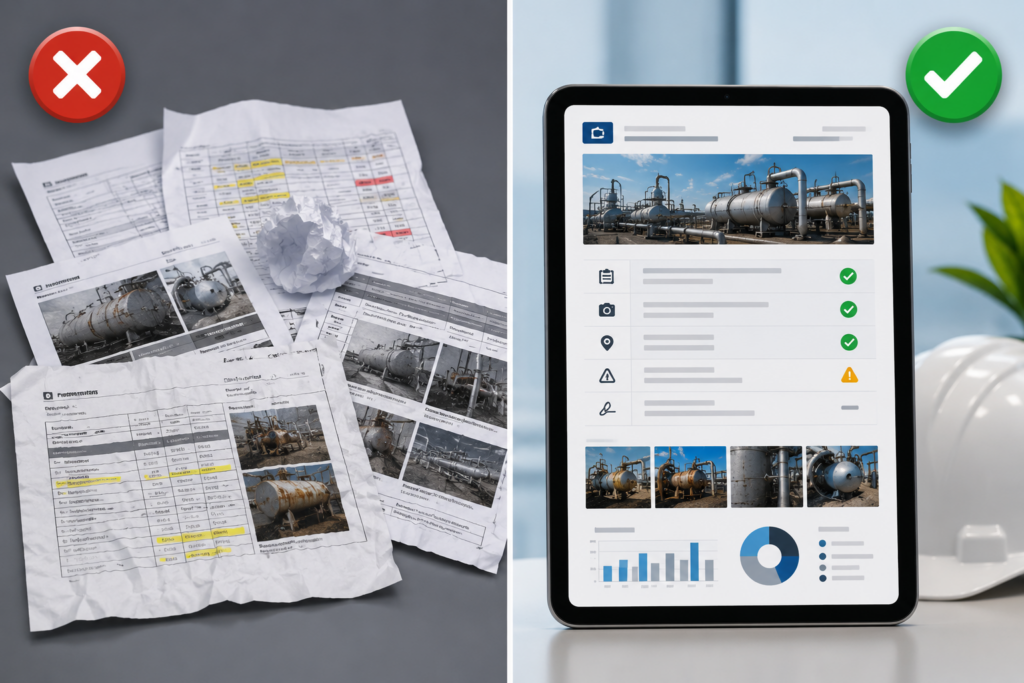
A third-party inspection firm bidding on a contract to provide quarterly fire safety inspections for a commercial real estate portfolio submits a sample inspection report as part of the proposal. The report contains all the right information (equipment inspected, deficiencies identified, recommendations provided) but it looks like it was assembled in Microsoft Word by someone who learned formatting in 1998. Inconsistent fonts. Low-resolution photos stretched to fill space. Headers that do not align. No company branding.
The competing firm submits a report that looks like it came from a professional consulting firm: clean layout, high-quality photos with captions, consistent branding, organized sections with clear visual hierarchy. The content is identical. The professionalism is not.
The client awards the contract to the firm with the better-looking report, not because they care about aesthetics for their own sake, but because professional-looking reports signal that the inspection firm is organized, detail-oriented, and takes their work seriously. Clients assume that a company that cannot produce a professional-looking report probably is not running a professional operation.
This dynamic plays out in every industry where inspection firms compete for contracts: building inspections, equipment testing, NDT services, fire safety, elevators, HVAC. The inspection firms that win and retain clients are not always the ones with the most experienced inspectors. They are the ones that deliver reports clients are proud to forward to their own stakeholders, insurance companies, and regulatory agencies.
This article explains why most inspection software produces generic, unprofessional-looking reports, what “professional” actually means in the context of inspection documentation, and how inspection companies can generate client-ready reports without hiring graphic designers or spending hours on manual formatting.
Why Generic Inspection Reports Cost You Clients
Clients Forward Your Reports to Their Stakeholders
Commercial property managers, facility directors, and compliance officers do not just file your inspection reports in a drawer. They forward them to:
- Building owners and investors
- Insurance underwriters reviewing coverage
- Regulatory agencies during audits
- Prospective tenants conducting due diligence
- Executive teams reviewing facility conditions
When your report lands in front of these audiences, it represents not just the inspection work but your client’s operational professionalism. If the report looks amateurish, it reflects poorly on the client, and the client stops using your services.
Professional Reports Justify Professional Pricing
Inspection firms charging premium rates need to deliver premium deliverables. A building inspection that costs $500 and produces a report that looks like it was generated by free software does not justify the price in the client’s mind. The same inspection delivered in a polished, branded, professionally formatted report feels like $500 worth of value.
Clients are not paying for pretty pictures. They are paying for confidence that the work was done thoroughly and documented professionally. Report appearance is how that confidence is communicated.
Unprofessional Reports Signal Operational Disorganization
Clients make assumptions based on report quality. A report with inconsistent formatting, low-resolution photos, missing page numbers, or typos signals that the inspection firm is not detail-oriented, is not using modern tools, and probably has other operational gaps the client has not discovered yet.
Fair or not, report appearance is how clients assess operational competency when they do not have other data to go on.
For more on how inspection platforms support professional reporting, see Field Eagle’s inspection report capabilities.
What “Professional” Actually Means in Inspection Reports
Professional does not mean elaborate. It means organized, readable, and visually consistent. Here is what that looks like in practice:
Feature 1: Consistent Branding Throughout the Report
What this means:
The report includes the inspection company’s logo, color scheme, and contact information on every page or in the header/footer. The branding is subtle and consistent, not overbearing.
What unprofessional looks like:
Generic templates with no branding, or branding that is inconsistently applied (logo on page 1 but not on subsequent pages, different fonts on different sections).
Why it matters:
Clients need to know who produced the report when it gets forwarded to third parties. Branding also reinforces the inspection company’s professional identity.
Feature 2: High-Quality Photos with Captions
What this means:
Photos are displayed at appropriate resolution (not pixelated or stretched). Each photo has a caption explaining what it shows (“Fire extinguisher missing from 3rd floor corridor,” “Cracked weld on elevator guide rail support”).
What unprofessional looks like:
Low-resolution photos that look blurry when printed. Photos with no captions or context. Photos stretched to fill space, distorting the aspect ratio.
Why it matters:
Photos without captions are nearly useless to anyone who was not on site during the inspection. High-quality, captioned photos make the report self-explanatory.
Feature 3: Organized Sections with Clear Visual Hierarchy
What this means:
The report is divided into logical sections (executive summary, equipment inspected, deficiencies identified, recommendations) with clear headers. Fonts, spacing, and alignment are consistent throughout.
What unprofessional looks like:
Wall-of-text reports with no clear sections. Inconsistent font sizes. Headers that do not stand out from body text. Misaligned tables.
Why it matters:
Clients need to be able to scan the report quickly to find key information. Visual hierarchy (headers, spacing, formatting) makes that possible.
Feature 4: Tables and Data Presented in Readable Formats
What this means:
If the inspection includes tabular data (equipment lists, deficiency summaries, compliance checklists), that data is presented in properly formatted tables with clear column headers and readable spacing.
What unprofessional looks like:
Data crammed into narrow columns with text wrapping awkwardly. Tables that break across pages with no continuation formatting. Inconsistent alignment.
Why it matters:
Tables that are hard to read defeat the purpose of presenting data in table format. Readable tables communicate information efficiently. Poorly formatted tables create confusion.
Feature 5: Professional Formatting That Holds Up When Printed or Forwarded
What this means:
The report is formatted as a PDF with proper page breaks, page numbers, and print-friendly layouts. When the client prints it or forwards it as an email attachment, it still looks professional.
What unprofessional looks like:
Reports exported as Word documents that reflow unpredictably when opened on different computers. Page breaks in awkward places. Missing fonts when viewed on different systems.
Why it matters:
Clients will print, forward, and archive your reports. If the formatting breaks when they do, the report stops being useful.
For more on inspection software designed for professional deliverables, see Field Eagle’s inspection software.
How to Generate Professional Reports Without Manual Formatting
Solution 1: Use Inspection Software with Configurable Report Templates
Instead of assembling reports manually in Word, use inspection software that auto-generates reports from inspection data using pre-designed templates. The template defines the layout, branding, fonts, spacing, and table formatting once. Every report generated from that template inherits the same professional formatting automatically.
Field Eagle allows inspection companies to configure report templates by client or inspection type. One client gets a detailed narrative format. Another gets a tabular checklist format. A third gets an executive summary format. The system applies the right template to the right inspection automatically.
Solution 2: Embed High-Quality Photos with Automatic Captioning
Instead of manually inserting photos into Word documents, capture photos in the inspection app with captions entered at the point of observation. The photo and caption are embedded in the inspection record automatically. When the report is generated, photos appear in context with their captions already formatted.
This eliminates the manual step of downloading photos, inserting them into the report, resizing them, and typing captions; all of which is time-consuming and error-prone.
Solution 3: Configure Client-Specific Branding Once and Reuse It
Instead of manually adding logos and contact information to every report, configure the branding settings in the inspection software once. The system applies the branding to every report automatically. Logo placement, color scheme, header/footer content, and contact information are consistent across all reports without requiring manual formatting.
Solution 4: Generate Reports as PDFs, Not Word Documents
PDFs preserve formatting regardless of who opens them or on what device. Fonts, spacing, page breaks, and image quality remain consistent. Word documents reflow unpredictably and often lose formatting when opened on different systems.
Inspection software should generate final reports as PDFs by default, with the option to export editable formats only when necessary.
CASE STUDY: How a Building Inspection Firm Won 3 New Contracts by Upgrading Report Quality
A building inspection firm serving commercial properties was losing bids to competitors despite having more experienced inspectors. Client feedback indicated that the firm’s reports looked “outdated” and “hard to read” compared to competing proposals.
After implementing Field Eagle’s inspection platform with configurable professional report templates, the firm made four key changes:
Change 1: Reports were auto-generated from inspection data using branded templates
Manual Word document assembly was eliminated. Reports were generated as PDFs with the firm’s branding, consistent formatting, and professional layout.
Change 2: Photos were embedded with captions automatically
Inspectors captured photos in the app with captions. The system inserted photos into reports with proper sizing and captions already formatted.
Change 3: Different report formats were configured for different client types
Commercial real estate clients received executive summary formats. Institutional clients received detailed technical formats. The system applied the right template to the right client automatically.
Change 4: Report delivery time dropped from 3 days to same-day
Because reports were auto-generated rather than manually assembled, delivery time improved significantly. Clients received professional reports the same day as the inspection.
Within six months, the firm won three new long-term contracts specifically because clients cited report quality and delivery speed as differentiators. The firm’s win rate on competitive bids improved from approximately 40% to over 60%.
For more examples of how inspection companies are improving client outcomes, see Field Eagle’s case studies.
The ROI of Professional Inspection Reports
What to Look for in Inspection Software Report Capabilities
Configurable templates: The platform should support multiple report templates configured by client or inspection type.
Automatic photo embedding: Photos captured during inspections should be inserted into reports automatically with captions.
Branding customization: Logo, colors, fonts, header/footer, and contact information should be configurable and applied consistently.
Professional formatting: Tables, spacing, alignment, and page breaks should be handled automatically and consistently.
PDF generation: Reports should be generated as PDFs by default to preserve formatting.
Client-specific formats: Different clients should be able to receive different report formats without requiring custom development for each client.
Preview before sending: Inspectors or report reviewers should be able to preview the report before it is sent to the client.
Field Eagle’s inspection software is built around professional report generation. Learn more about inspection report capabilities.
FAQs
Clients cannot directly assess the quality of the inspection work unless they were on site watching the inspector. Report quality is the primary signal clients use to assess the inspection firm’s professionalism and attention to detail. A professional-looking report signals that the firm is organized, uses modern tools, and takes their work seriously. An unprofessional report signals the opposite, even if the underlying inspection work was thorough.
Yes. Field Eagle supports configurable report templates so that different clients can receive different report formats without requiring custom development for each client. The inspection company configures the template once (layout, sections, formatting, branding), and the system applies that template to all inspections for that client. Templates can be duplicated and modified to create variations without starting from scratch.
Inspection software captures photos during the inspection with captions entered at the point of observation. When the report is generated, the system inserts the photos into the report automatically in the appropriate sections with captions already formatted. The inspector does not download photos, insert them into Word, resize them, or type captions. The entire process is automatic.
Word documents reflow and change formatting when opened on different computers, especially if the recipient does not have the same fonts installed. PDFs preserve formatting exactly as designed regardless of who opens them or on what device. For inspection reports that will be printed, forwarded, and archived by clients, PDFs are far more reliable than Word documents.
Initial template configuration typically takes 1 to 3 hours depending on how complex the report format is and how much customization is needed. Most inspection companies start with a pre-built template and modify it to match their branding and layout preferences. Once configured, the template is reused for all future inspections without additional setup time.