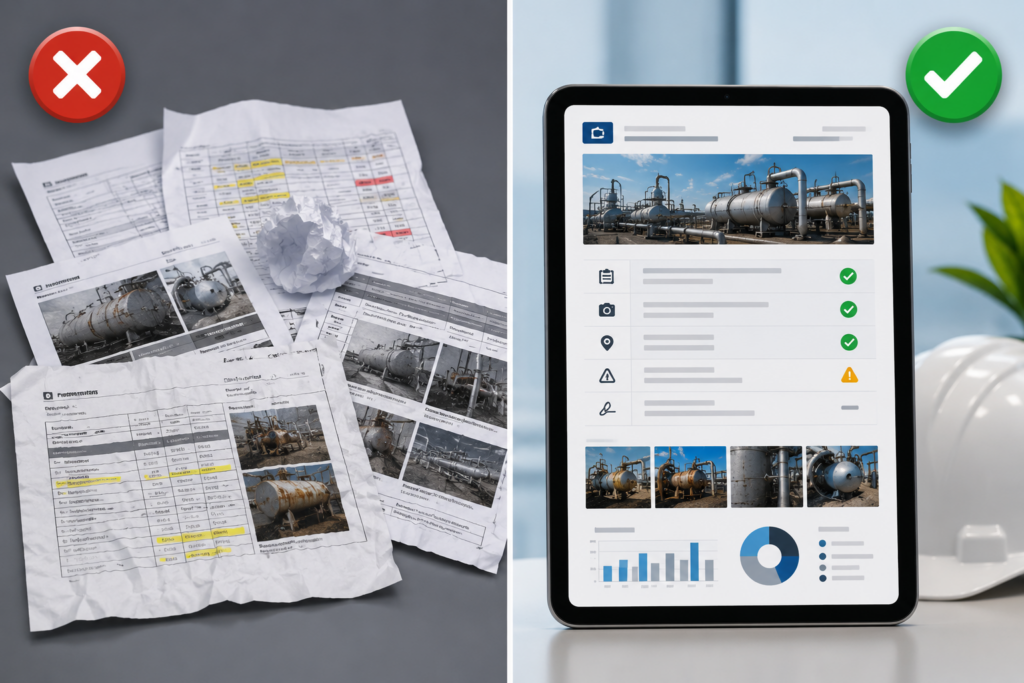
A third-party inspection firm bidding on a contract to provide quarterly fire safety inspections for a commercial real estate portfolio submits a sample inspection report as part of the proposal. The report contains all the right information (equipment inspected, deficiencies identified, recommendations provided) but it looks like it was assembled in Microsoft Word by someone who learned formatting in 1998. Inconsistent fonts. Low-resolution photos stretched to fill space. Headers that do not align. No company branding.
The competing firm submits a report that looks like it came from a professional consulting firm: clean layout, high-quality photos with captions, consistent branding, organized sections with clear visual hierarchy. The content is identical. The professionalism is not.
The client awards the contract to the firm with the better-looking report, not because they care about aesthetics for their own sake, but because professional-looking reports signal that the inspection firm is organized, detail-oriented, and takes their work seriously. Clients assume that a company that cannot produce a professional-looking report probably is not running a professional operation.
This dynamic plays out in every industry where inspection firms compete for contracts: building inspections, equipment testing, NDT services, fire safety, elevators, HVAC. The inspection firms that win and retain clients are not always the ones with the most experienced inspectors. They are the ones that deliver reports clients are proud to forward to their own stakeholders, insurance companies, and regulatory agencies.
This article explains why most inspection software produces generic, unprofessional-looking reports, what “professional” actually means in the context of inspection documentation, and how inspection companies can generate client-ready reports without hiring graphic designers or spending hours on manual formatting.
Why Generic Inspection Reports Cost You Clients
Clients Forward Your Reports to Their Stakeholders
Commercial property managers, facility directors, and compliance officers do not just file your inspection reports in a drawer. They forward them to:
- Building owners and investors
- Insurance underwriters reviewing coverage
- Regulatory agencies during audits
- Prospective tenants conducting due diligence
- Executive teams reviewing facility conditions
When your report lands in front of these audiences, it represents not just the inspection work but your client’s operational professionalism. If the report looks amateurish, it reflects poorly on the client, and the client stops using your services.
Professional Reports Justify Professional Pricing
Inspection firms charging premium rates need to deliver premium deliverables. A building inspection that costs $500 and produces a report that looks like it was generated by free software does not justify the price in the client’s mind. The same inspection delivered in a polished, branded, professionally formatted report feels like $500 worth of value.
Clients are not paying for pretty pictures. They are paying for confidence that the work was done thoroughly and documented professionally. Report appearance is how that confidence is communicated.
Unprofessional Reports Signal Operational Disorganization
Clients make assumptions based on report quality. A report with inconsistent formatting, low-resolution photos, missing page numbers, or typos signals that the inspection firm is not detail-oriented, is not using modern tools, and probably has other operational gaps the client has not discovered yet.
Fair or not, report appearance is how clients assess operational competency when they do not have other data to go on.
For more on how inspection platforms support professional reporting, see Field Eagle’s inspection report capabilities.
What “Professional” Actually Means in Inspection Reports
Professional does not mean elaborate. It means organized, readable, and visually consistent. Here is what that looks like in practice:
Feature 1: Consistent Branding Throughout the Report
What this means:
The report includes the inspection company’s logo, color scheme, and contact information on every page or in the header/footer. The branding is subtle and consistent, not overbearing.
What unprofessional looks like:
Generic templates with no branding, or branding that is inconsistently applied (logo on page 1 but not on subsequent pages, different fonts on different sections).
Why it matters:
Clients need to know who produced the report when it gets forwarded to third parties. Branding also reinforces the inspection company’s professional identity.
Feature 2: High-Quality Photos with Captions
What this means:
Photos are displayed at appropriate resolution (not pixelated or stretched). Each photo has a caption explaining what it shows (“Fire extinguisher missing from 3rd floor corridor,” “Cracked weld on elevator guide rail support”).
What unprofessional looks like:
Low-resolution photos that look blurry when printed. Photos with no captions or context. Photos stretched to fill space, distorting the aspect ratio.
Why it matters:
Photos without captions are nearly useless to anyone who was not on site during the inspection. High-quality, captioned photos make the report self-explanatory.
Feature 3: Organized Sections with Clear Visual Hierarchy
What this means:
The report is divided into logical sections (executive summary, equipment inspected, deficiencies identified, recommendations) with clear headers. Fonts, spacing, and alignment are consistent throughout.
What unprofessional looks like:
Wall-of-text reports with no clear sections. Inconsistent font sizes. Headers that do not stand out from body text. Misaligned tables.
Why it matters:
Clients need to be able to scan the report quickly to find key information. Visual hierarchy (headers, spacing, formatting) makes that possible.
Feature 4: Tables and Data Presented in Readable Formats
What this means:
If the inspection includes tabular data (equipment lists, deficiency summaries, compliance checklists), that data is presented in properly formatted tables with clear column headers and readable spacing.
What unprofessional looks like:
Data crammed into narrow columns with text wrapping awkwardly. Tables that break across pages with no continuation formatting. Inconsistent alignment.
Why it matters:
Tables that are hard to read defeat the purpose of presenting data in table format. Readable tables communicate information efficiently. Poorly formatted tables create confusion.
Feature 5: Professional Formatting That Holds Up When Printed or Forwarded
What this means:
The report is formatted as a PDF with proper page breaks, page numbers, and print-friendly layouts. When the client prints it or forwards it as an email attachment, it still looks professional.
What unprofessional looks like:
Reports exported as Word documents that reflow unpredictably when opened on different computers. Page breaks in awkward places. Missing fonts when viewed on different systems.
Why it matters:
Clients will print, forward, and archive your reports. If the formatting breaks when they do, the report stops being useful.
For more on inspection software designed for professional deliverables, see Field Eagle’s inspection software.
How to Generate Professional Reports Without Manual Formatting
Solution 1: Use Inspection Software with Configurable Report Templates
Instead of assembling reports manually in Word, use inspection software that auto-generates reports from inspection data using pre-designed templates. The template defines the layout, branding, fonts, spacing, and table formatting once. Every report generated from that template inherits the same professional formatting automatically.
Field Eagle allows inspection companies to configure report templates by client or inspection type. One client gets a detailed narrative format. Another gets a tabular checklist format. A third gets an executive summary format. The system applies the right template to the right inspection automatically.
Solution 2: Embed High-Quality Photos with Automatic Captioning
Instead of manually inserting photos into Word documents, inspectors capture and caption them in the inspection app at the point of observation. Then, the app automatically embeds each photo and caption in the inspection record. When the system generates the report, each photo appears in context with its caption already formatted.
This eliminates the manual step of downloading photos, inserting them into the report, resizing them, and typing captions; all of which is time-consuming and error-prone.
Solution 3: Configure Client-Specific Branding Once and Reuse It
Instead of manually adding logos and contact information to every report, configure the branding settings in the inspection software once. The system applies the branding to every report automatically. Logo placement, color scheme, header/footer content, and contact information are consistent across all reports without requiring manual formatting.
Solution 4: Generate Reports as PDFs, Not Word Documents
PDFs preserve formatting regardless of who opens them or on what device. Fonts, spacing, page breaks, and image quality remain consistent. Word documents reflow unpredictably and often lose formatting when opened on different systems.
Inspection software should generate final reports as PDFs by default, with the option to export editable formats only when necessary.
CASE STUDY: How a Building Inspection Firm Won 3 New Contracts by Upgrading Report Quality
A building inspection firm serving commercial properties was losing bids to competitors despite having more experienced inspectors. Client feedback indicated that the firm’s reports looked “outdated” and “hard to read” compared to competing proposals.
After implementing Field Eagle’s inspection platform with configurable professional report templates, the firm made four key changes:
Change 1: Reports were auto-generated from inspection data using branded templates
As a result, the firm eliminated manual Word document assembly. Instead, the system generated professionally formatted PDFs with consistent branding and layout.
Change 2: Photos were embedded with captions automatically
Inspectors captured photos in the app with captions. The system inserted photos into reports with proper sizing and captions already formatted.
Change 3: Different report formats were configured for different client types
Commercial real estate clients received executive summary formats. Institutional clients received detailed technical formats. The system applied the right template to the right client automatically.
Change 4: Report delivery time dropped from 3 days to same-day
Because reports were auto-generated rather than manually assembled, delivery time improved significantly. Clients received professional reports the same day as the inspection.
Within six months, the firm won three new long-term contracts specifically because clients cited report quality and delivery speed as differentiators. The firm’s win rate on competitive bids improved from approximately 40% to over 60%.
For more examples of how inspection companies are improving client outcomes, see Field Eagle’s case studies.
The ROI of Professional Inspection Reports
What to Look for in Inspection Software Report Capabilities
Configurable templates: First, the platform should let teams configure multiple report templates by client or inspection type.
Automatic photo embedding: Next, the platform should automatically insert inspection photos and captions into reports.
Branding customization: Additionally, teams should configure logos, colors, fonts, headers, footers, and contact information for consistent use.
Professional formatting: Moreover, the platform should automatically manage tables, spacing, alignment, and page breaks.
PDF generation: By default, the platform should generate PDF reports to preserve formatting.
Client-specific formats: Furthermore, teams should create different report formats for each client without custom development.
Preview before sending: Finally, inspectors or reviewers should preview each report before sending it to the client.
Field Eagle’s inspection software is built around professional report generation. Learn more about inspection report capabilities.
FAQs
When clients search their inspection history through a portal, they stop requesting reports by email. As a result, inspection companies reduce retrieval requests by 70% to 80%. However, they can quickly handle remaining requests from insurers and regulators using the same search tools.
Yes. Field Eagle supports configurable report templates for different client formats without custom development. First, the inspection company configures the layout, sections, formatting, and branding. Then, the system applies the template to every inspection for that client. Additionally, teams can duplicate and modify templates instead of starting from scratch.
Inspection software captures photos and captions at the point of observation. Then, the system automatically places each photo in the correct report section with a formatted caption. As a result, inspectors no longer need to download, resize, or insert photos into Word or retype captions.
Word documents may reflow or change formatting across computers, especially when recipients lack the required fonts. In contrast, PDFs preserve the intended layout on every device. Therefore, PDFs provide greater reliability for inspection reports that clients print, forward, and archive.
Initial template configuration usually takes 1 to 3 hours, depending on the report’s complexity and customization needs. First, most inspection companies adapt a pre-built template to match their branding and layout. Once configured, they reuse the template for future inspections without additional setup.